Quick Answer
A pool chlorine calculator estimates how much chlorine to add by comparing your current chlorine level with your target chlorine level.
The tool uses pool volume, ppm increase, chlorine type, and chlorine strength to calculate the required dose.
For many residential pools, a common target free chlorine range is around 1–3 ppm, but the correct level can depend on pool type, stabilizer level, local guidance, and product label directions.
Always test your water first and follow the chlorine product label before adding chemicals.
What Is This Pool Chlorine Calculator?
This tool is an online chlorine dosage calculator for swimming pools. It helps you estimate how much chlorine is needed to raise the chlorine level from your current ppm to your target ppm.
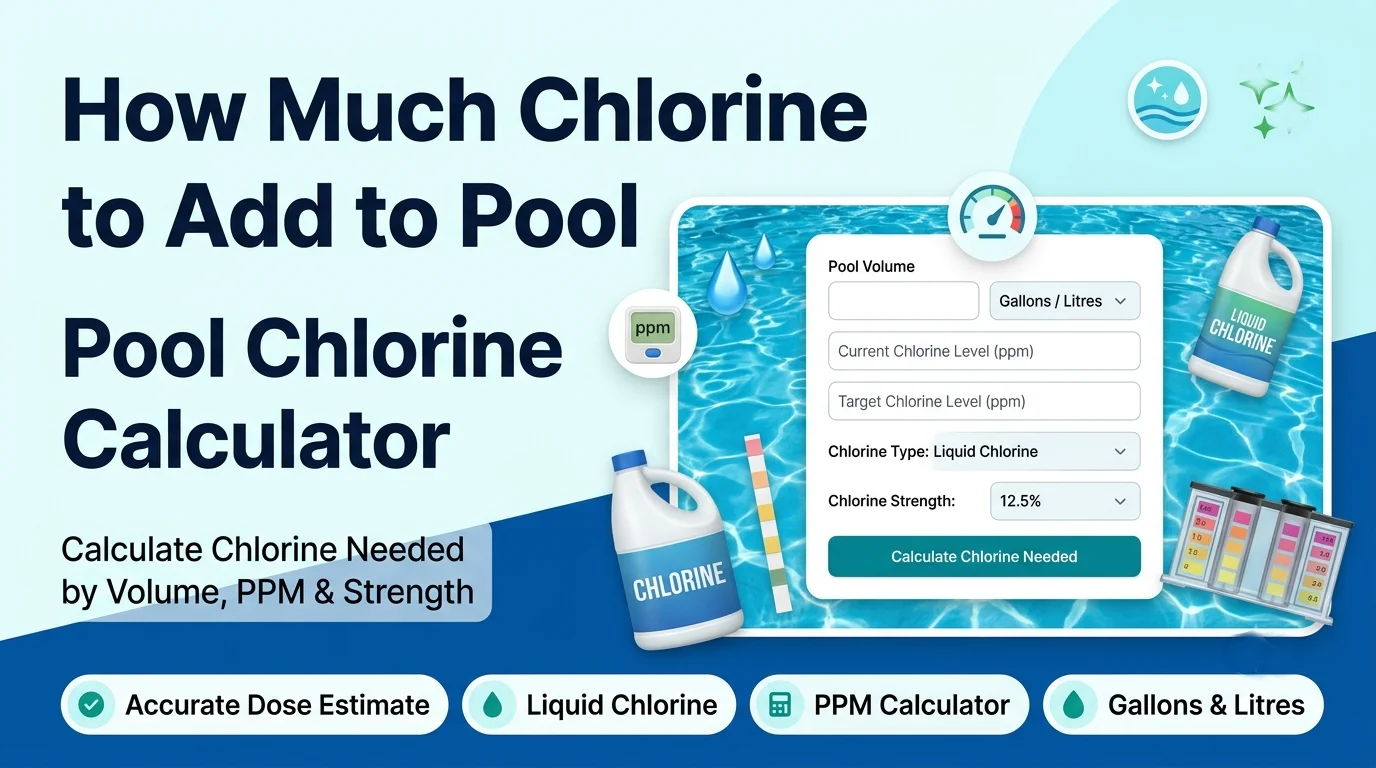
The screenshot shows a simple calculator form with a Pool Volume input, a volume unit dropdown set to Gallons, a Current Chlorine Level slider, a Target Chlorine Level slider, a Chlorine Type dropdown, a Chlorine Strength (%) field, and a blue Calculate Chlorine Needed button.
You can use it as a how much chlorine to add to pool calculator, liquid chlorine calculator, chlorine ppm calculator, or chlorine dosage calculator pool when adjusting pool sanitizer levels.
How to Use the How Much Chlorine to Add to Pool Calculator
1. Enter Your Pool Volume
Type your pool volume into the Pool Volume field. The screenshot shows an example value of 2.
Use the dropdown beside the field to choose the volume unit, such as gallons or litres if available. Accurate pool volume is important because chlorine dosage is based on how much water you are treating.
2. Set the Current Chlorine Level
Use a pool test kit or test strip to measure your current free chlorine level. Then move the Current Chlorine Level (ppm) slider to match your result.
The screenshot shows the current chlorine level set around 1 ppm.
3. Set the Target Chlorine Level
Move the Target Chlorine Level (ppm) slider to the level you want to reach. The screenshot shows a target value of 3 ppm and includes a note that the ideal range is commonly 1–3 ppm for residential pools.
4. Choose the Chlorine Type
Select the chlorine product type from the Chlorine Type dropdown. The visible option in the screenshot is Liquid Chlorine (Sodium Hypochlorite).
If your calculator includes other chlorine types, choose the one that matches your product label.
5. Enter Chlorine Strength
Enter the product concentration in the Chlorine Strength (%) field. The screenshot shows 12.5, which is common for some liquid pool chlorine products.
The note below the field reminds users to check the product label for concentration. This matters because 6%, 10%, and 12.5% chlorine products require different amounts.
6. Click Calculate Chlorine Needed
Click the blue Calculate Chlorine Needed button. The tool then estimates the amount of chlorine needed based on your pool volume, current ppm, target ppm, chlorine type, and strength.
Chlorine Dose Formula
The calculator works by finding the ppm increase needed, then converting that increase into a chlorine dose for your pool volume.
PPM Increase = Target Chlorine ppm − Current Chlorine ppm
For liquid chlorine, a practical pool-care shortcut is:
Liquid Chlorine Gallons = Pool Gallons × PPM Increase ÷ (10,000 × Chlorine Strength %)
To convert that result into fluid ounces:
Fluid Ounces = Liquid Chlorine Gallons × 128
This formula is an estimate for pool dosing. Actual product instructions may vary, so always follow the product label and retest your water after circulation.
Key Features
Pool Volume Input
The pool volume field lets you calculate the chlorine amount for your actual pool size instead of relying on generic advice. This helps with small pools, above-ground pools, Intex-style pools, and larger swimming pools.
Gallons or Litres Unit Selection
The visible unit dropdown helps users choose the correct volume unit. This is useful for searches such as pool chlorine calculator litres, how much chlorine to add to pool per litre, and how much chlorine to add to pool per gallon.
Current and Target PPM Sliders
The sliders make it easy to set your current chlorine level and target level. This helps the tool calculate only the chlorine increase you actually need.
Chlorine Type Dropdown
The chlorine type field helps match the calculation to the product you are using. The screenshot shows liquid chlorine, also called sodium hypochlorite.
Chlorine Strength Field
The strength field lets you enter the concentration printed on your product label. This is important because stronger chlorine products require a smaller dose than weaker products.
One-Click Calculation
The blue Calculate Chlorine Needed button gives a quick estimate without manual unit conversion or complicated pool math.
Why Use a Pool Chlorine Calculator?
Guessing chlorine amounts can lead to under-dosing or over-dosing. Too little chlorine may allow cloudy water, algae, and poor sanitation. Too much chlorine may cause strong odors, swimmer discomfort, and unnecessary chemical waste.
This calculator saves time by connecting your pool volume, test result, target ppm, and chlorine strength in one place. It is useful for pool opening, weekly maintenance, after heavy rain, after high swimmer use, or when free chlorine tests lower than your target.
It also helps pool owners compare different products. For example, the amount of 12.5% liquid chlorine needed is not the same as the amount of a weaker bleach solution or another sanitizer product.
Practical Example: How Much Liquid Chlorine to Add
Suppose your pool has 10,000 gallons of water. Your current chlorine level is 1 ppm, and your target is 3 ppm. You are using 12.5% liquid chlorine.
First, calculate the ppm increase:
3 ppm − 1 ppm = 2 ppm increase
Now estimate the liquid chlorine dose:
10,000 × 2 ÷ (10,000 × 12.5) = 0.16 gallons
Convert gallons to fluid ounces:
0.16 × 128 = 20.48 fl oz
So, for this example, you would need about 20.5 fluid ounces of 12.5% liquid chlorine to raise a 10,000-gallon pool by about 2 ppm. Retest after the water circulates.
When Should You Add Chlorine to a Pool?
You may need to add chlorine when your test result shows free chlorine below your target range. This can happen after sunlight exposure, rain, heavy swimming, warm weather, algae growth, or organic debris entering the water.
Many pool owners test chlorine several times per week during swimming season. Some pools may need daily checks during hot weather or heavy use. Always base dosing on a current water test instead of adding chlorine blindly.
If you are opening a pool, filling a new pool, or recovering a green pool, you may need a different treatment plan than routine maintenance. This calculator helps estimate a dose, but severe algae or shock treatment may require extra steps.
Who Can Use This Tool?
This chlorine calculator is useful for homeowners, above-ground pool owners, Intex pool users, pool maintenance beginners, landlords, property managers, and pool service helpers who need a quick chlorine dose estimate.
It can also help users who search for terms like how much chlorine for 1000 gallon pool, how much chlorine to add to 5000 gallon pool, how much liquid chlorine to add to 10000 gallon pool, or how much chlorine to add to pool weekly.
For commercial pools, public pools, spas, or regulated facilities, follow local rules, health codes, and professional water testing procedures.
Common Mistakes to Avoid
Using the Wrong Pool Volume
If the pool volume is wrong, the chlorine amount will also be wrong. Measure or estimate your pool volume carefully before calculating.
Ignoring Chlorine Strength
Do not assume every liquid chlorine product has the same strength. Check the label and enter the correct percentage, such as 6%, 10%, or 12.5%.
Adding Chlorine Without Testing
Always test first. The calculator needs your current chlorine level to estimate the correct increase.
Targeting Too High Without a Reason
Routine chlorine adjustment is different from shocking a pool. Do not raise chlorine far above the normal target unless the product label or a proper pool-care plan supports it.
Swimming Too Soon After Dosing
After adding chlorine, let the pump circulate the water and retest before swimming. Follow the safety directions on the product label.
Helpful Tips for Better Results
- Test free chlorine and pH before adding chlorine.
- Use the product label to confirm chlorine strength and safe handling instructions.
- Add liquid chlorine slowly with the pump running for better mixing.
- Retest after circulation before adding more chlorine.
- Store chlorine safely, away from heat, sunlight, children, pets, and incompatible chemicals.
- Never mix chlorine with other chemicals in a bucket or container.
Limitations
This tool provides an estimate for chlorine dosing. It does not replace product label instructions, local pool regulations, professional pool service advice, or proper water testing.
The result depends on correct pool volume, correct current ppm, correct target ppm, correct chlorine type, and accurate chlorine strength. If any input is wrong, the dose estimate may be wrong.
Pool chemistry can also be affected by pH, cyanuric acid stabilizer, sunlight, water temperature, algae, bather load, and filtration. If your pool stays cloudy, green, or unstable, test the full water chemistry and consider professional help.
Conclusion
The How Much Chlorine to Add to Pool Calculator helps you estimate the chlorine dose needed to raise your pool from its current ppm to your target ppm. It uses pool volume, chlorine level, chlorine type, and product strength to give a practical dosing estimate.
Use this pool chlorine calculator when opening a pool, adjusting weekly chlorine, topping up after a low test result, or estimating how much liquid chlorine to add to a pool. Test first, calculate carefully, follow the product label, and retest after circulation.
FAQs
How much chlorine should I add to my pool?
The amount depends on your pool volume, current chlorine ppm, target ppm, chlorine type, and chlorine strength. Use the calculator to estimate the dose from your actual test result.
How do I calculate how much chlorine to add to a pool?
Subtract current ppm from target ppm to find the needed increase. Then apply the dose based on pool volume and product strength. The calculator does this automatically.
How much liquid chlorine do I add to raise 1 ppm?
For 10,000 gallons, 1 gallon of 10% liquid chlorine raises chlorine by about 10 ppm, so about 12.8 fl oz raises it by about 1 ppm. Stronger or weaker products require different amounts.
What is the ideal chlorine level for a residential pool?
A common free chlorine range for many residential pools is about 1–3 ppm. The right target may vary depending on stabilizer level, pool type, local guidance, and product instructions.
Can I use this calculator for litres?
Yes, if your tool’s unit dropdown supports litres. Enter the pool volume in litres and choose the correct unit before calculating.
How much chlorine do I add to a pool at startup?
Startup dosing depends on pool volume, current chlorine level, water condition, and target ppm. Test the water first, then use the calculator to estimate the dose needed to reach your target.
Can this calculator be used for green pool shock treatment?
It can estimate a chlorine dose, but green pools often need a full cleanup plan, brushing, filtration, pH adjustment, and repeated testing. Follow pool shock product instructions carefully.
Useful Pet & Animal Name Tools
If you are using the Pet Name Generator, these related tools and guides can help you find dog names, cat names, cute names, and random animal inspiration.
- Dog Name Generator – find friendly and memorable dog name ideas.
- Best Dog Names – explore helpful dog name ideas for different personalities and styles.
- Best Cat Names – find cat name inspiration for pets or fictional animals.
- Random Animal Generator – generate random animals for games, stories, and creative prompts.