This tool is useful when you want to check keyword ranking, track SEO progress, compare search visibility, or confirm whether a page appears in the top results. Use it whenever you need a quick Google keyword rank check for your website, client site, blog, landing page, or business domain.
Quick answer
A Keyword Rank Checker is an SEO tool that checks your website ranking for selected keywords in Google search results. You enter your domain, choose a country, add up to 10 keywords, and run the ranking check. The tool shows the keyword position, ranking URL, top 10 status, and a quick option to open the SERP.
What is this keyword rank checker tool?
This keyword rank checker tool checks whether your website appears in Google results for specific keywords. It helps you find the ranking position of your domain without manually searching each keyword in a browser.
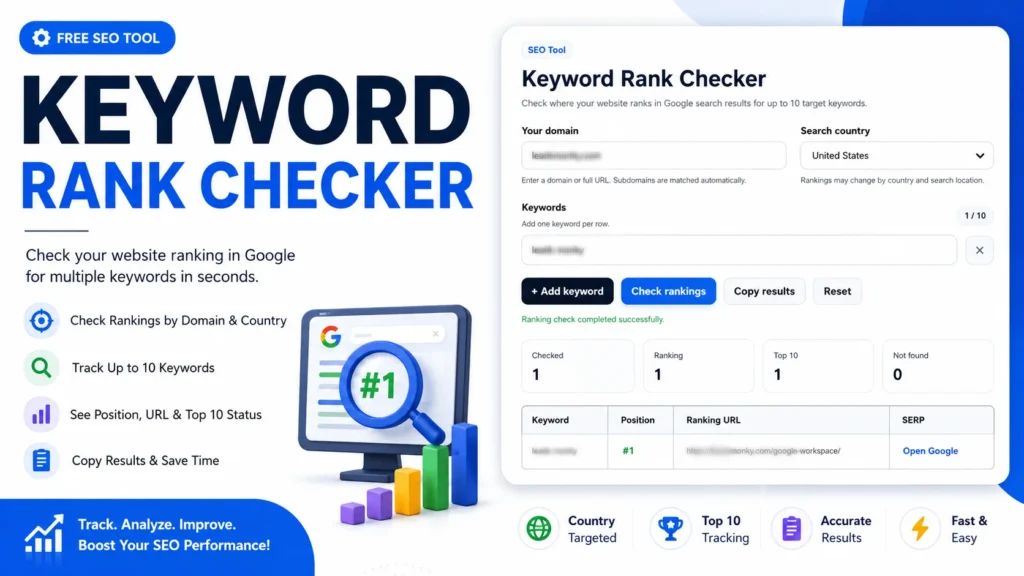
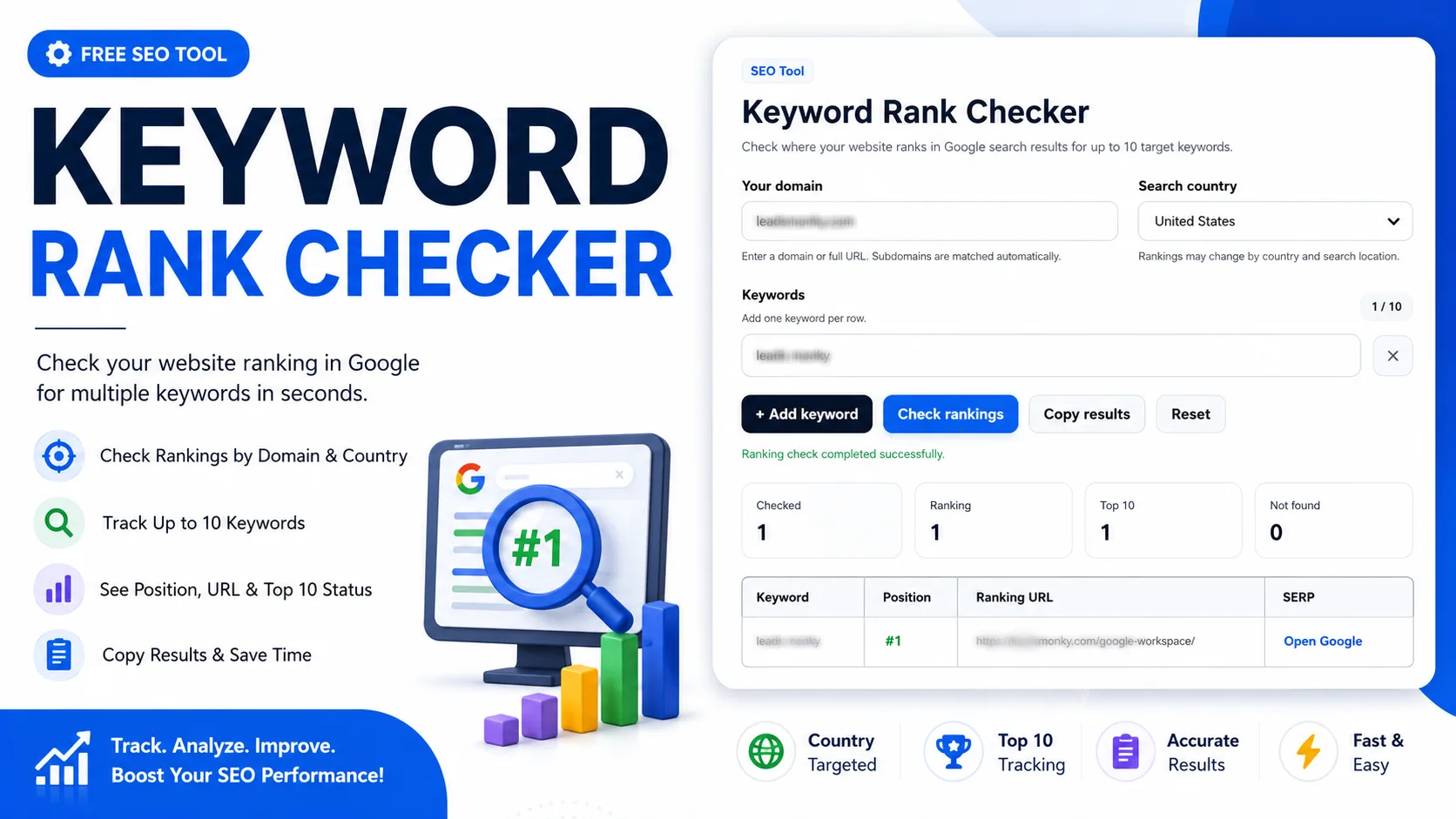
The tool is designed for fast keyword ranking checks. Based on the visible interface, it includes a domain field, search country dropdown, keyword input rows, an add keyword button, a check rankings button, a copy results button, a reset button, summary cards, and a results table.
You can use it as a website keyword rank checker, Google keyword rank checker, SERP keyword rank checker, or quick keyword position checker. It is especially helpful when you want to check multiple keyword rankings for one domain.
How to use the keyword rank checker
1. Enter your domain
Start by adding your website domain in the Your domain field. The screenshot shows an example domain entered as leadsmonky.com. You can enter a full domain or URL, and subdomains are matched automatically when supported by the tool settings.
2. Select the search country
Use the Search country dropdown to choose the location where you want to check rankings. The visible example is set to United States. This matters because Google rankings can change by country, region, and search location.
3. Add your target keywords
Enter one keyword per row in the keyword field. The interface shows a keyword counter, such as 1 / 10, which means the tool can check up to 10 target keywords at a time. You can use short keywords, long-tail keywords, branded queries, service keywords, or local SEO terms.
4. Add more keywords if needed
Click the + Add keyword button to add another keyword row. This is useful when you want to check keywords ranking in bulk instead of running one search at a time.
5. Run the ranking check
Click the Check rankings button to start the search. After the tool completes the check, it displays a success message and updates the result cards.
6. Review the summary cards
The visible result area includes cards for Checked, Ranking, Top 10, and Not found. These cards help you understand how many keywords were checked, how many ranked, how many appeared in the top 10, and how many were not found.
7. Read the ranking table
The result table shows the keyword, position, ranking URL, and SERP action. In the screenshot, the keyword appears at #1, and the ranking URL is shown beside it. You can also use the Open Google option to view the search result page.
8. Copy or reset results
Use Copy results when you want to save, share, or paste the ranking data into a report. Use Reset when you want to clear the current inputs and start a new keyword ranking check.
Key features of this keyword rank checker
Domain-based ranking check
The tool checks rankings for a specific domain. This helps you focus on your own website or a client website instead of viewing general SERP data without context.
Country-specific search results
The country dropdown helps you check Google ranking for keywords in a selected location. This is useful for local SEO, national SEO, affiliate sites, service businesses, and location-sensitive search results.
Multiple keyword checking
The keyword counter shows that you can add up to 10 keywords. This makes the tool useful as a multiple keyword rank checker for quick audits, campaign checks, and weekly SEO reviews.
Clear ranking position
The results table shows the keyword position clearly, such as #1. This helps you quickly understand whether a keyword is ranking near the top or needs more SEO work.
Ranking URL detection
The tool displays the ranking URL found for each keyword. This helps you see which page Google is ranking, not just whether your domain appears somewhere in the results.
Top 10 and not found summary
The summary cards make the report easier to read. You can quickly see how many keywords ranked, how many reached the top 10, and how many were not found in the checked results.
Copy results option
The copy button saves time when preparing SEO reports, client updates, or quick notes. Instead of manually typing each ranking position, you can copy the checked data directly.
Reset button for a fresh check
The reset option clears the current check and lets you start again. This is helpful when you want to test another domain, keyword set, or country.
Why use a keyword rank checker?
A keyword rank checker saves time and reduces manual work. Searching Google manually can give unclear results because personalization, browser history, location, and device settings may affect what you see.
This tool gives a cleaner way to check website keyword ranking by domain, keyword, and country. It helps you measure SEO performance, monitor content progress, and find which pages are gaining or losing visibility.
It is also useful for finding quick SEO wins. If a keyword is already near the top 10, you may improve the ranking page with better headings, stronger internal links, updated content, or improved search intent coverage.
Practical example
Suppose you run a website and want to check whether your page ranks for the keyword leads monky. You enter your domain, select the United States, add the keyword, and click Check rankings.
If the tool shows position #1, it means the checked domain was found in the first organic position for that keyword in the selected country. If it shows Not found, the domain was not detected within the checked SERP range.
Simple tracking formula: Top 10 rate = (keywords in top 10 ÷ checked keywords) × 100
For example, if you check 10 keywords and 4 appear in the top 10, your top 10 rate is 40%. This does not measure all SEO performance, but it gives a quick snapshot of search visibility.
Not found formula: Not found count = checked keywords − keywords with detected rankings
Who can use this tool?
This keyword ranking checker is useful for SEO professionals, website owners, bloggers, affiliate marketers, content writers, agencies, freelancers, local businesses, SaaS teams, eCommerce store owners, and digital marketers.
Students and beginners can also use it to understand how keyword rankings work. Instead of reading complex SEO reports, they can enter a domain and keyword to see a simple ranking result.
When should you check keyword ranking?
You should check keyword ranking after publishing new content, updating old pages, building internal links, improving on-page SEO, changing page titles, adding schema, or running an SEO campaign.
You can also check rankings weekly or monthly to monitor progress. Daily checks are usually not necessary for every keyword because rankings can move naturally, especially for competitive or fresh search results.
Common mistakes to avoid
Using the wrong domain format
Enter the correct domain or URL. A small spelling mistake can cause the tool to miss your ranking page. Check the domain carefully before running the ranking check.
Ignoring country selection
Search results can differ by location. If your audience is in the United States, check the United States. If your audience is in another country, choose the correct country when available.
Checking only one keyword
One keyword does not show your full SEO performance. Add related terms, long-tail keywords, service keywords, and branded queries to get a better picture.
Confusing ranking position with traffic
A high ranking does not always mean high traffic. Search volume, click-through rate, intent, SERP features, and competition can all affect actual visits.
Not checking the ranking URL
Always review the ranking URL. Sometimes Google ranks a different page than expected. That can show you whether your target page needs better optimization or internal linking.
Helpful tips for better results
Use exact keywords that real users search. For example, check terms like keyword rank checker, check keyword ranking, google keyword rank checker, and website keyword rank checker when they match your page topic.
Group keywords by intent. Keep informational terms, commercial terms, branded terms, and local terms separate when reviewing results. This makes your SEO decisions clearer.
Track ranking changes over time. One check gives a snapshot, but repeated checks help you understand whether your content is improving, staying flat, or losing visibility.
Use the copy results button to save a record of each check. This helps you compare today’s ranking data with future results.
Limitations of this keyword ranking checker
This tool can help you check Google keyword ranking quickly, but rankings can change over time. Search results may vary based on location, device, personalization, search settings, language, and Google updates.
The results depend on the domain, selected country, entered keywords, and the tool’s checking method. If a keyword is typed incorrectly or the wrong country is selected, the result may not match your real target market.
The tool is best for quick keyword position checks, SERP checks, and SEO monitoring. It should not be the only source for major SEO decisions. Combine it with analytics, search console data, content audits, and conversion tracking for a complete view.
Conclusion
A Keyword Rank Checker makes it easier to check Google rankings for your website without manual searching. You can enter your domain, select a country, add target keywords, and review positions, ranking URLs, top 10 counts, and not found results.
Use this keyword rank checker when you need a fast, simple, and practical way to monitor SEO visibility. It helps you save time, understand ranking progress, and decide which pages need more optimization.
FAQs
What is a keyword rank checker?
A keyword rank checker is a tool that checks where a website appears in Google search results for a selected keyword. It helps you find ranking position, ranking URL, and keyword visibility.
How do I check keyword ranking in Google?
Enter your domain, choose the search country, add your keyword, and click the check rankings button. The tool will show whether your website ranks and which URL appears in the result.
Can I check multiple keyword rankings?
Yes. The visible tool interface allows up to 10 target keywords. Add one keyword per row and run the check to review multiple keyword rankings together.
Why does keyword ranking change by country?
Google results can vary by search location because users in different countries may see different pages, local results, and SERP features. That is why selecting the correct country is important.
What does “not found” mean in keyword ranking?
Not found means the tool did not detect your domain for that keyword within the checked search results. It may mean the page is not ranking, ranks too low, or the keyword/domain input needs checking.
Is this a free keyword rank checker?
If the tool is available without payment on your page, users can use it as a free keyword rank checker. It is useful for quick checks, small SEO audits, and basic ranking reviews.
Should I check keyword rankings every day?
Daily checks are not always needed because rankings naturally move. Weekly or monthly checks are usually better for spotting meaningful SEO trends and content performance changes.
Useful SEO & Website Optimization Tools
If you are using the SERP Keyword Rank Checker, these related tools can help with Fiverr SEO, URL optimization, broken link checks, and content formatting.
- How to Rank Fiverr Gig on First Page – a helpful guide for improving Fiverr search visibility.
- Fiverr Tags Generator Tool – generate relevant tags for gigs and freelance services.
- Dead Link Checker – find broken links that may affect user experience and SEO quality.
- URL Slug Generator – create clean SEO-friendly URLs for pages, posts, and tools.