Markdown is easy to write, but many websites, CMS editors, emails, and publishing systems need HTML. This Markdown to HTML Converter helps you convert Markdown into clean HTML output, so you can prepare formatted content without manually writing every tag.
The tool also includes an HTML to Markdown direction for turning basic HTML back into readable Markdown. Paste your content, choose the conversion direction, click Convert, then copy the result for your website, documentation, blog post, or editing workflow.
Quick Answer
The Markdown to HTML Converter changes Markdown syntax into HTML code. It can also switch direction and convert basic HTML back into Markdown when needed.
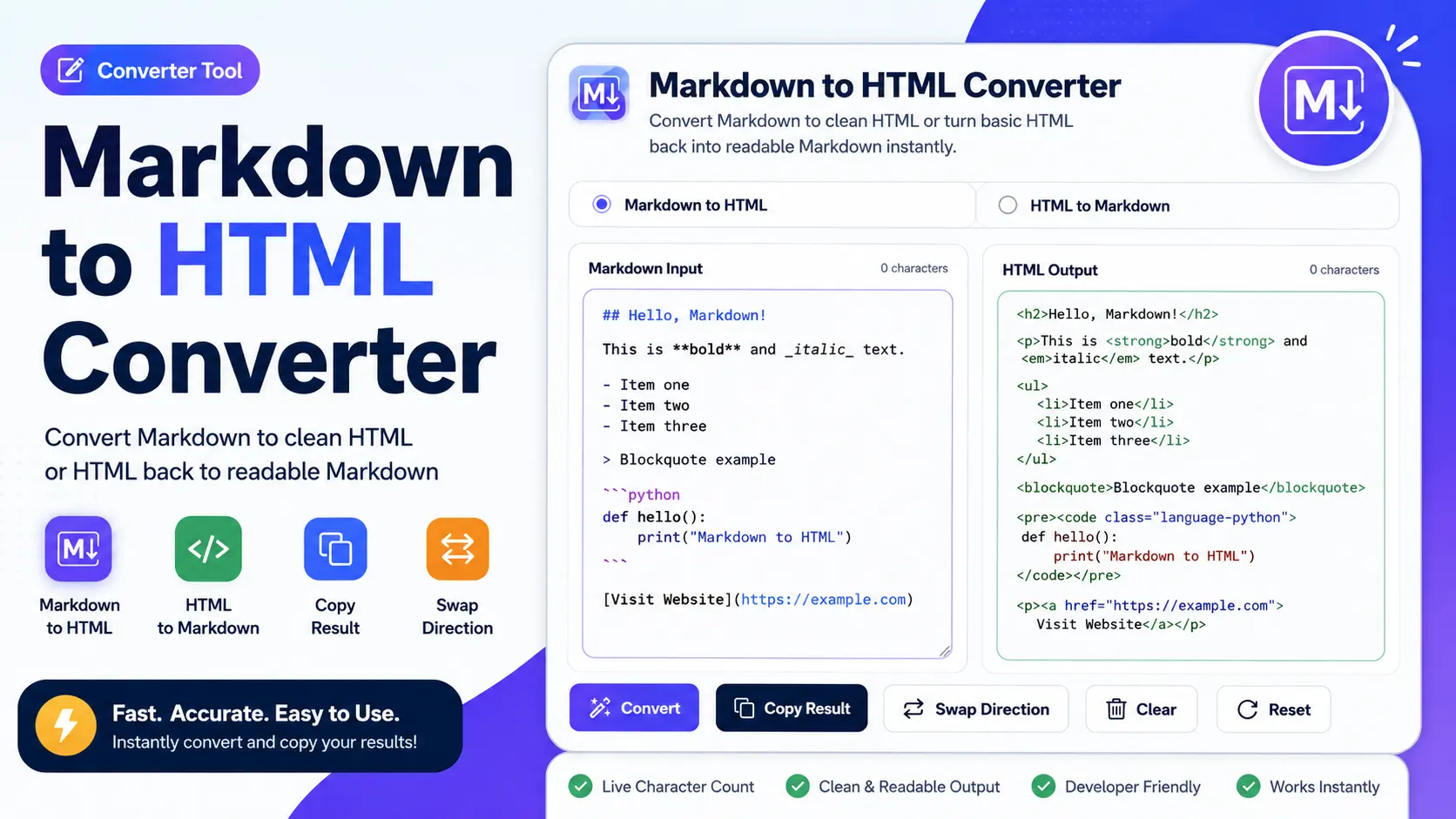
The tool includes Markdown Input, HTML Output, character counts, Convert, Copy Result, Swap Direction, Clear, and Reset controls. It is useful for writers, developers, bloggers, students, SEO teams, and anyone who works with formatted web content.
What Is This Markdown to HTML Converter?
This Markdown to HTML Converter is an online converter tool that turns Markdown-formatted text into HTML markup. Markdown uses simple symbols for formatting, while HTML uses tags that browsers, CMS editors, and web pages understand.
For example, a Markdown heading like ## My Heading can become <h2>My Heading</h2>.
The visible tool interface includes two conversion direction options: “Markdown to HTML” and “HTML to Markdown.” It also has a Markdown Input box, an HTML Output box, character counts for both sides, and buttons for Convert, Copy Result, Swap Direction, Clear, and Reset.
This makes the tool useful for both publishing and editing workflows. You can write in Markdown and convert it to HTML, or switch direction when you need to clean up simple HTML into a more readable Markdown format.
How Does This Tool Work?
The tool reads the syntax in your input box and converts it based on the selected direction. When “Markdown to HTML” is selected, it turns Markdown patterns into HTML tags. When “HTML to Markdown” is selected, it converts supported HTML tags back into Markdown-style formatting.
The basic Markdown to HTML process is:
Markdown input → parse Markdown syntax → generate HTML tags → copy HTML output
The reverse HTML to Markdown process is:
HTML input → read supported tags → convert to Markdown syntax → copy Markdown output
Common Markdown elements include headings, paragraphs, bold text, italic text, links, lists, blockquotes, inline code, code blocks, and tables if table syntax is supported. The exact result depends on the input content and the formatting rules supported by the converter.
How to Use This Markdown to HTML Converter
- Choose the conversion direction: Select “Markdown to HTML” if you want HTML output. Select “HTML to Markdown” if you want readable Markdown output from basic HTML.
- Paste your input: Add your Markdown or HTML into the input box. The visible placeholder says “Paste your Markdown here…” when Markdown to HTML is selected.
- Check the character count: The tool shows a character count above the input and output areas, which helps you track content length.
- Click Convert: Use the Convert button to generate the converted result.
- Review the output: Check the output box before using the converted content. The visible output area says the converted result will appear there.
- Copy the result: Use the Copy Result button to copy the converted HTML or Markdown.
- Swap direction if needed: Use the Swap Direction button to switch between Markdown to HTML and HTML to Markdown.
- Clear or reset: Use Clear to remove current content, or Reset to return the tool to its default state.
Key Features
Markdown to HTML Conversion
The main feature converts Markdown into HTML markup. This helps users turn simple writing syntax into web-ready code for pages, posts, documentation, and CMS fields.
HTML to Markdown Direction
The visible “HTML to Markdown” option is useful when you have basic HTML and want to turn it back into simpler Markdown. This can help clean up readable drafts, documentation, or editing notes.
Side-by-Side Input and Output
The tool shows the input and output areas next to each other. This makes it easier to paste content, convert it, and review the result without moving between separate pages.
Character Counts
Both the input and output sections show character counts. This is helpful when preparing content for systems with length limits or when comparing how much text changed after conversion.
Copy Result Button
The Copy Result button helps you move the converted content quickly into a CMS, code editor, documentation platform, email builder, or website file.
Swap Direction Button
The Swap Direction button saves time when you need to change conversion mode. Instead of manually starting over, you can switch between Markdown to HTML and HTML to Markdown.
Clear and Reset Controls
Clear helps remove the current text, while Reset helps return the converter to its starting setup. These controls are useful when testing multiple drafts or conversion examples.
Why Use This Tool?
This converter saves time because you do not need to manually write HTML tags for every heading, paragraph, list, link, or formatted phrase. You can write naturally in Markdown and then convert it when HTML is needed.
It also reduces formatting mistakes. Manually writing HTML can lead to missing closing tags, broken links, incorrect nesting, or inconsistent list formatting. A converter makes the process easier when your input syntax is clean.
For developers and technical writers, Markdown is often the fastest way to draft documentation. HTML is often needed for web output. This tool helps bridge that gap.
For bloggers, content editors, and SEO teams, the tool can convert article drafts, outlines, headings, lists, and formatted notes into HTML that can be used in publishing systems.
Practical Example
Suppose you enter this Markdown:
## Benefits of Markdown
Markdown is **easy to write** and useful for [documentation](https://example.com).
– Simple syntax
– Clean formatting
The converted HTML may look like this:
<h2>Benefits of Markdown</h2>
<p>Markdown is <strong>easy to write</strong> and useful for <a href=”https://example.com”>documentation</a>.</p>
<ul><li>Simple syntax</li><li>Clean formatting</li></ul>
This output can then be copied and used in a web page, CMS editor, or documentation system that accepts HTML. If you switch direction, basic HTML can be converted back into Markdown for easier editing.
Who Can Use This Tool?
- Writers: Convert Markdown drafts into HTML for publishing.
- Bloggers: Prepare formatted post content for websites and CMS platforms.
- Developers: Convert README-style content, notes, and documentation into HTML markup.
- Technical writers: Format help documents, guides, and knowledge base content.
- Students: Convert Markdown notes into HTML for projects and assignments.
- SEO teams: Prepare headings, lists, links, and structured content for on-page use.
- Content editors: Move content between Markdown-based and HTML-based workflows.
Common Mistakes to Avoid
Using Broken Markdown Syntax
If the Markdown is not written correctly, the HTML output may not look right. Check headings, links, lists, tables, and code blocks before converting.
Expecting Every Markdown Version to Behave the Same
Markdown has different flavors and extensions. Some converters may handle tables, task lists, fenced code blocks, or line breaks differently.
Confusing the Conversion Direction
Before clicking Convert, make sure the correct direction is selected. Choose Markdown to HTML for HTML output, or HTML to Markdown for Markdown output.
Copying Output Without Reviewing It
Always check the converted result before publishing. Look for broken links, missing headings, unexpected line breaks, or formatting that does not match your goal.
Pasting Unsafe HTML Into a Website
If your Markdown includes raw HTML, review it carefully before publishing. Avoid adding untrusted scripts, embeds, or unsafe code to a live page.
Helpful Tips
- Use proper Markdown spacing before converting lists and code blocks.
- Keep headings structured clearly so the HTML output is easier to read.
- Check links after conversion to make sure URLs are correct.
- Use the character counts to monitor long content.
- Use Swap Direction when moving between editing and publishing workflows.
- Preview the output in your CMS, browser, or editor before publishing.
- Keep a copy of the original Markdown in case you need to edit it later.
Limitations
This Markdown to HTML Converter is useful for quick formatting, but the final output depends on the input syntax and supported conversion rules.
Advanced Markdown features may not convert the same across all tools. Tables, task lists, footnotes, diagrams, math notation, embedded HTML, and custom Markdown extensions may require extra support.
The HTML to Markdown direction is best for basic readable HTML. Complex layouts, inline styles, scripts, advanced tables, and deeply nested HTML may not convert perfectly into clean Markdown.
The tool is not a full HTML validator, accessibility checker, security scanner, or design editor. For production pages, review the output and test it in the system where it will be used.
Some CMS platforms, email builders, and website editors may rewrite or remove certain HTML tags. Always preview the final result after pasting it into your publishing platform.
Conclusion
The Markdown to HTML Converter is a practical tool for turning Markdown into clean HTML and, when needed, converting basic HTML back into Markdown. It helps users prepare formatted content faster with input and output boxes, character counts, direction switching, copy, clear, and reset controls.
Use this Markdown to HTML Converter when you want to write in a simple format, convert it into web-ready markup, and copy the result into your website, CMS, blog post, documentation page, or editing workflow.
FAQs
What is a Markdown to HTML Converter?
A Markdown to HTML Converter is a tool that changes Markdown syntax into HTML code. It helps convert headings, paragraphs, links, lists, bold text, italic text, code blocks, and other supported formatting.
How do I convert Markdown to HTML online?
Paste your Markdown into the input box, select Markdown to HTML, and click Convert. Then review the HTML output and copy the result.
Can this tool convert HTML to Markdown too?
Yes, the visible tool includes an HTML to Markdown option. Use Swap Direction or choose the HTML to Markdown mode when you need to convert basic HTML into readable Markdown.
Can I copy the converted output?
Yes, the tool includes a Copy Result button. After conversion, use it to copy the HTML or Markdown output quickly.
Does this converter support Markdown tables?
Markdown table support depends on the converter rules. If tables are supported, table syntax can be converted into HTML table markup, but you should review the output before publishing.
Is Markdown the same as HTML?
No. Markdown is a simpler writing syntax, while HTML is a markup language used to structure web pages. Markdown can be converted into HTML for web publishing.
Does Markdown to HTML conversion always look the same?
Not always. Output can vary depending on the Markdown syntax, supported features, and the platform where the HTML is pasted. Preview the result before publishing.
Useful Writing & Text Formatting Tools
If you are using the Markdown to HTML Converter, these related tools can help with title formatting, text comparison, clipboard saving, and clean URL creation.
- Title Case Converter – quickly format headings, titles, and captions with clean capitalization.
- Diff Checker Online – compare Markdown, HTML, or edited text versions side by side.
- Free Online Clipboard – copy, save, and manage text snippets online without login.
- URL Slug Generator – turn titles and headings into clean SEO-friendly URLs.